Group B
CNN Object Detection
Solution and implementation for QB5 from Artificial Neural Network (ann).
B5_CNN_obj_detect.ipynb
Download
Dog vs Cat Image Classification
This notebook demonstrates a simple binary classification model using TensorFlow and Keras.
Code Cell [In]
!pip install tensorflow opencv-python matplotlib -q
1. Environment Setup and Imports
Installing and importing necessary libraries for computer vision and deep learning.
Code Cell [In]
import cv2
import numpy as np
import matplotlib.pyplot as plt
import tensorflow as tf
from tensorflow.keras import layers, models
2. Dataset Loading
Loading the 'cats_vs_dogs' dataset from TensorFlow Datasets.
Code Cell [In]
import tensorflow_datasets as tfds

dataset, info = tfds.load('cats_vs_dogs', with_info=True, as_supervised=True)

train_data = dataset['train']
Code Cell [In]
plt.figure(figsize=(10,5))

for i, (image, label) in enumerate(train_data.take(5)):
    plt.subplot(1,5,i+1)
    plt.imshow(image)
    plt.title("Dog" if label.numpy() == 1 else "Cat")
    plt.axis("off")

plt.show()
3. Data Preprocessing
Normalizing and resizing images to prepare them for the neural network.
Code Cell [In]
IMG_SIZE = 128

def preprocess(image, label):
    image = tf.image.resize(image, (IMG_SIZE, IMG_SIZE))
    image = image / 255.0
    return image, label

train_data = train_data.map(preprocess).batch(32).take(200)  # small subset
4. Model Architecture
Building a Convolutional Neural Network (CNN) for binary classification.
Code Cell [In]
model = models.Sequential([
    layers.Conv2D(16, (3,3), activation='relu', input_shape=(128,128,3)),
    layers.MaxPooling2D(),

    layers.Conv2D(32, (3,3), activation='relu'),
    layers.MaxPooling2D(),

    layers.Flatten(),
    layers.Dense(64, activation='relu'),
    layers.Dense(1, activation='sigmoid')  # binary classification
])

model.compile(optimizer='adam',
              loss='binary_crossentropy',
              metrics=['accuracy'])

model.summary()
5. Model Training
Training the model on a subset of the data.
Code Cell [In]
history = model.fit(train_data, epochs=3)
6. Inference and Visualization
Defining a prediction function and testing it on an image.
Code Cell [In]
def predict_image(img_path):
    img = cv2.imread(img_path)
    img_resized = cv2.resize(img, (128,128))
    img_norm = img_resized / 255.0
    img_input = np.expand_dims(img_norm, axis=0)

    prediction = model.predict(img_input)[0][0]

    label = "Dog" if prediction > 0.5 else "Cat"
    return img, label
Code Cell [In]
img, label = predict_image("image1.jpg")

# Draw a simple bounding box (whole image)
h, w, _ = img.shape
cv2.rectangle(img, (10,10), (w-10, h-10), (0,255,0), 2)

cv2.putText(img, label, (20,40),
            cv2.FONT_HERSHEY_SIMPLEX, 1,
            (0,255,0), 2)

plt.imshow(cv2.cvtColor(img, cv2.COLOR_BGR2RGB))
plt.axis('off')
Code Cell [In]
img, label = predict_image("image2.jpg")

# Draw a simple bounding box (whole image)
h, w, _ = img.shape
cv2.rectangle(img, (10,10), (w-10, h-10), (0,255,0), 2)

cv2.putText(img, label, (20,40),
            cv2.FONT_HERSHEY_SIMPLEX, 1,
            (0,255,0), 2)

plt.imshow(cv2.cvtColor(img, cv2.COLOR_BGR2RGB))
plt.axis('off')
image1.jpg
Download
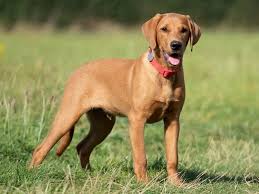
image2.jpg
Download

Other Questions in Artificial Neural Network
See All Available Questions- QA1: Write a Python program to plot a few activation functions that are being used in neural networks.
- QA2: Generate ANDNOT function using McCulloch-Pitts neural net by a python program.
- QA3: Write a Python program to design a perceptron for even and odd numbers.
- QA4: Write a Python program to implement a perceptron and plot the decision regions.
- QA5: Write a Python program to simulate Bidirectional Associative Memory (BAM).
- QA7: Write a Python program to implement artificial neural network for forward propagation and back propagation.
- QB1: Write a Python program to implement XOR using back propagation algorithm.
- QB3: Write a Python program to simulate a feed forward neural network using back propagation algorithm.
- QB4: Write a Python program to simulate Hopfield network.
- QC1: 1. How to Train a Neural Network with TensorFlow/Pytorch and evaluation of logistic regression using tensorflow
- QC2: 2. TensorFlow/Pytorch implementation of CNN
- QC4: 4. MNIST Handwritten Character Detection using PyTorch, Keras and Tensorflow